
What a visitor should see before scrolling
Example: the first phone screen of a local service business
Example phone screen for a local plumber, with a dashed line marking the fold. Above the fold it shows the five items listed below.
Tap-to-call phone number
One tap and they are talking to you
One fast-loading image
Not a slow, rotating slider
Say what you do and where
Clear at a glance, no guessing
One clear next step
A single main button, easy to tap
Proof they can trust
Reviews and years in business
Seconds Matter
The chance a visitor leaves goes up 32% when a mobile page takes 3 seconds to load instead of 1.
More retail conversions when mobile pages got just 0.1 seconds faster, across 37 brands and 30 million visits.
Of viewing time went to the part of the page people saw before scrolling, in eye-tracking tests on desktop screens.
Part 1: Page speed
Google measures speed with three numbers called Core Web Vitals. They come from real people visiting your site on their own phones and computers, not from a lab test.
What Google counts as a fast page
The three Core Web Vitals, measured on real visits (75th percentile, phone and desktop separately)
LCPLargest Contentful Paint
How long until the main content shows
Good: 2.5 seconds or less. Needs work: up to 4 seconds. Poor: over 4 seconds.
INPInteraction to Next Paint
How quickly the page reacts to a tap or click
Good: 200 milliseconds or less. Needs work: up to 500 milliseconds. Poor: over 500 milliseconds.
CLSCumulative Layout Shift
How much the layout jumps around while loading
Good: 0.1 or less. Needs work: up to 0.25. Poor: over 0.25.
Source: Google, web.dev/articles/vitals. A page passes when at least 75% of real visits land in the green zone.
You may have seen the PageSpeed score that runs from 0 to 100. It’s a useful test and we use it to track down problems. The score itself isn’t the goal, though. The goal is a page that feels fast to your real visitors, and more of them getting in touch.
What usually slows a small business site down
- Photos uploaded straight from a phone or camera, sometimes several megabytes each
- A slider at the top that has to load four or five big images before anything else
- Old plugins and scripts nobody uses anymore, still loading on every page
- Fonts and chat widgets that hold the page back from showing
- Slow hosting, or a server nobody has ever tuned
- Images with no space saved for them, so the page jumps while it loads
Part 2: Above the fold
“Above the fold” is whatever someone sees before they scroll. On a phone that isn’t much room, so every piece has to earn its spot.
When we review your first screen, we ask some plain questions:
- Can a stranger tell what you do, and where, at a glance?
- Is there one obvious next step, or five buttons fighting for attention?
- Can someone on a phone call you with one tap?
- Is there a reason to trust you, like reviews, years in business, or real photos of your work?
- Does the main image load quickly, or is it a heavy slider?
- Does anything jump around while the page loads?
How we would do it on your site
- Measure where you are. We pull your real-visitor speed data from Google (PageSpeed Insights and Search Console) and agree on what counts as a conversion for you, whether that’s calls, form fills, or orders. If those aren’t being tracked yet, we set that up first, with your OK.
- Look at it the way your customers do. We open your key pages on actual phones and desktops and write down everything that slows them down or gets in the way.
- Fix the server side. We run our own servers, so we can tune the parts most web designers can’t reach: server response time, caching, current PHP 8 versions, and HTTP/2.
- Fix the site side. We resize and compress your images and serve them in lighter formats like WebP, and AVIF where it pays off. The main image loads first and the ones further down wait their turn. Plugins and scripts you don’t need come out, and images get their space saved so nothing jumps.
- Rework the first screen. A headline that says what you do and where, one main button, a phone number people can tap, and proof like your reviews. In most cases one strong image beats a slider.
- Check it, then measure again. We test every change on phones and desktops and keep a backup, so anything can be rolled back. Google’s real-visitor numbers cover the last 28 days, so once enough new visits are in we compare before and after and send you a short report on what changed and what we’d do next.
Real results: a site we rebuilt
Google PageSpeed Insights (mobile): the same client site before and after our rebuild.
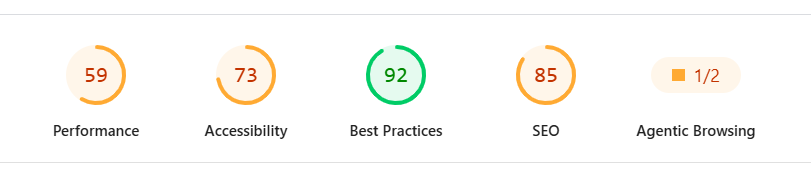
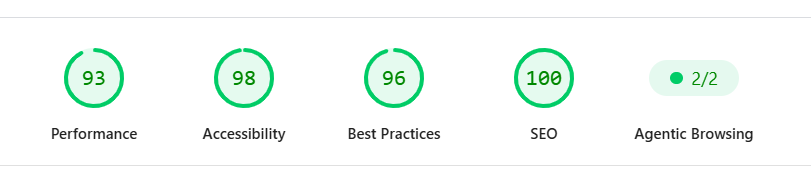
Conversion optimization is part of our Growth plan. Just want a one-time speed and first-screen fix? Ask us for a quote.
Turn More of Your Visitors Into Customers
You already work hard to get people to your website. Maybe they find you on Google, through an ad, or because a friend sent them. Conversion rate optimization (CRO) is about what happens after they arrive: how many of them actually call you or fill out your form.
We start where most small business sites lose people, which is the first few seconds. Two things decide those seconds. How fast the page shows up, and what is on the screen before anyone scrolls.
Start with a free 15-point Website & Security Audit
In about 48 hours you'll get a plain-English report on your site's speed, Google visibility, and security, including how many hacking bots hit your site last week. No obligation.
Or call 1-760-348-8208 (Mon–Fri, 9am–5pm AZ/MST).