
Choose shipping charges that fit the way you pack and send orders. Begin with the main calculation method, then check any threshold offer and the destinations it covers. The example amount below is only a setup example.
Choose a calculation method
A method that matches your packing routine is easier to maintain. A flat charge may suit similar parcels, while a range of weights or destinations may need another approach.
- From Control Panel Home, open Shipping Options to reach Manage Shipping.
- Review Select Shipping calculation method. Choose the method that fits your shipping policy.
- For a flat charge, choose Fixed Charge Per Order. and enter the Base Charge. The animation uses 7.95.
- Review the other fields used by your selected method. Click Save Main Shipping Options (Above) when those settings are ready.
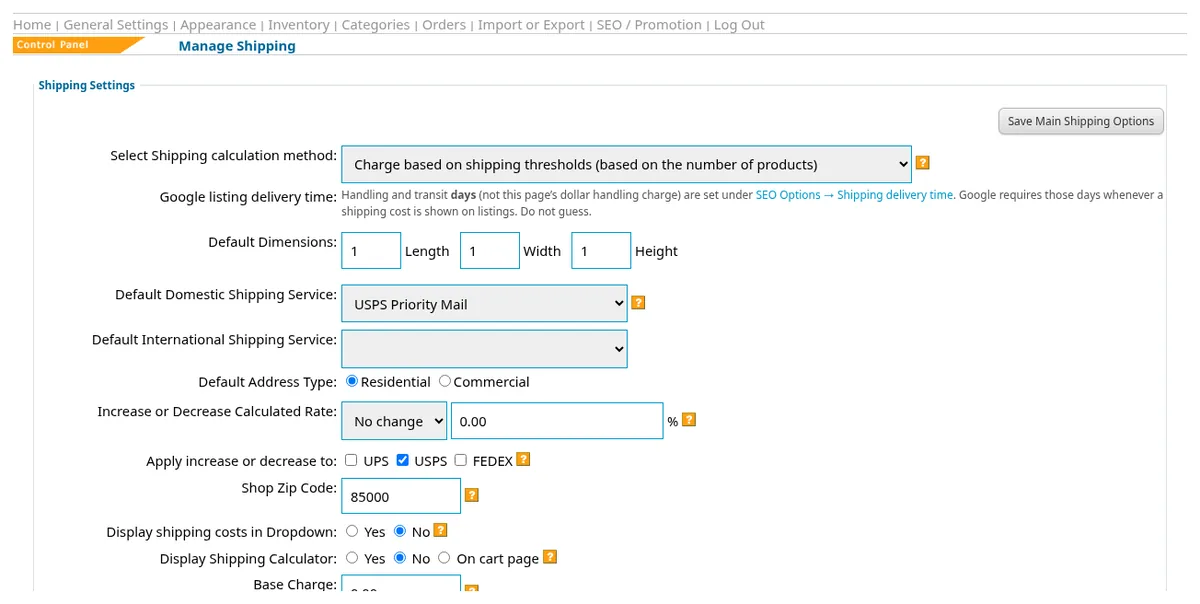
The list also offers Base Charge + Fixed Charge Per Item, Base + Weight, Base + Charge specified by items, and a percentage of item price. Carrier calculation is listed for UPS, USPS, and FedEx using ZIP codes and weight. Threshold methods can use the total purchase cost or the number of products. There is also a Do not charge shipping choice.
Do not choose a method just because its name sounds familiar. First write down how you want to charge for one item, several items, and a heavier parcel. Then compare that policy with the available method. If you use carrier calculation, review its setup fields and your item weights before relying on the displayed result.
Set a fixed or free shipping offer
A clear threshold can encourage shoppers to add another item. Set both the qualifying purchase amount and the shipping charge, so the offer says exactly what you mean.
- In Manage Shipping, find the row Fixed [amount] shipping for orders over [threshold] (enter 0 to disable).
- In the first box, between “Fixed” and “shipping”, enter the fixed shipping charge: 0 in the animation means $0 shipping (free).
- In the second box, enter the qualifying order threshold: 75 in the animation means orders of $75 or more ship free. A threshold of 0 disables the offer.
- Choose whether Fixed / Free shipping applies to domestic orders only or international and domestic orders.
- Review Service types free shipping applies to. Save with Save Main Shipping Options (Above).

Check the shopper experience
Reviewing a few sample baskets helps you catch confusing charges before you describe the offer to customers. Check different destinations if you sell beyond your domestic area.
- In Manage Shipping, review the minimum and maximum shipping charge fields along with the threshold settings.
- Review Display Shipping Calculator and Shipping Values on the Cart Page for the shopper display you want.
- Save your choices. In the shop, compare baskets below and above your chosen threshold, without completing a payment.
- Return to Manage Shipping if the charges do not match the policy you intended.
See SEO and Google listings for the delivery-time settings. If you plan a free shipping code, also review promo codes and gift certificates so the service choices match your offer.
Questions about your shop? Contact us for help with your next step.